
The Wordpress Loop
Everyone knows about the great Open Source Blogging tool known as Wordpress available due to the efforts of thousands of developers contributing from all over the world to make this one amazing kick start Blogging Tool that gets you ready in a few minutes to start your own Blog.
There are so many options to choose from when you are looking to setup your own Wordpress Blog. You get plethora of options to choose from the diverse Plugins, Widgets and Themes to extend your Blog into something more than just a Blogging tool. And this topic covers some of that sprints that you achieve with Wordpress with a little bit of Tweaking and PHP Programming.
Out of the most common problems you face in Wordpress is the handling of the Famous Wordress Loop. Im sure people who have worked on developing Wordpress Themes know a lot about the Wordpress Loop that starts something like this:
if (have_posts()) :
while (have_posts()) : the_post();
//-- POST DATA, POST META, POST CONTENT
endwhile;
endif;
This loop is the heart and soul when Wordpress begins to loop through all of the Posts ie. beginning from the latest post to the last post which is set by the Blog pages show at most option in Wordpress Admin Control Panel. So the loop begins from latest post and goes down to 10th post at last and then it quits from their with either a link to Previous Post or Next Post pagination links at the bottom or above the post as the theme goes.
"Necessity is the mother of all inventions" and so there needs to be a way to extend Wordpress somehow and turn it into a CMS like system but thats the hard part which most of us do not know. To go deeper into understanding how Wordpress will handle your Posts and Loops lets take an example of a live site steigerhoutenmeubelgigant.nl on this site notice the Two Sliding boxes in the Header.
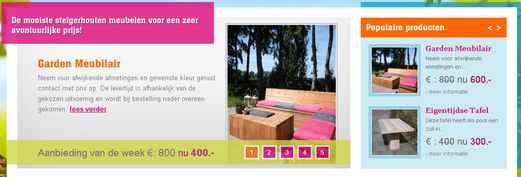
These two blocks are nothing but Posts that belong to some designated category. If you put your Wordpress Classic Loop in the index.php theme file, the loop will only go through Latest Post and down to the last post that you limited from WP Admin. So If you created a new post that does not belong to these two blocks then you are in for a big surprise. Wordpress does the JOB of looping but you will notice that it missed some of the posts that were missed, which belongs to these two Blocks. Wordpress will just follow the usual looping disregarding the fact that you need the loop to only retreive all the posts that belong to one of the header block categories lets say we named it populaire and aanbeinding respectively.
I had to digg into lots of Worpress Code, Wordpress Forums and Wordpress Codex for the loop to work correctly and the right method to acheive this effect is as belows:
//-- Set the query_posts variable to filter only one category ie. Loop through posts that contains
//-- only posts from default-meubel category and retreive all the posts that belong to that category.
//-- This should be done right before where you put have_posts() if condition!
query_posts('cat='.get_steiger_option('default-meubel').'showposts=-1&orderby=category');
if (have_posts()) :
while (have_posts()) : the_post();
$sopts = get_option('steiger_options');
//-- Then you can let the Loop Roll, and do the Magic, default-meubel category is the default category
//-- which means every post that is suppose to be in one of those Header Blocks is assigned this category
//-- later you can extend it further by categorizing it into further more categories and filter the category
//-- you want by using the function in_category()
if (in_category($sopts['korting'])):
if(get_post_meta($post->ID, "korting_percentage", $single = true) !="") :
$korting_percent = get_post_meta($post->ID, "korting_percentage", $single = true).' % ';
else:
$korting_percent = "";
endif;
$fclass = 'flag-korting'; $flag = $korting_percent."Korting";
endif;
if (in_category($sopts['aanbieding-van-de-week'])): $fclass = 'flag-aanbieding'; $flag = "Aanbieding"; endif;
if (in_category($sopts['nieuw'])): $fclass = 'flag-nieuw'; $flag = "Nieuw"; endif;
if (empty($flag)): $flag = 'Nieuw'; endif;
endwhile;
endif;
So, This is not all there is to this topic of disscussion! There will be more coming up regarding the tweaks and tricks you can use to extend your Wordpress themes beyond limits. Having troubles in finding the right solution for you then you can bug me here inquiry[at-the-rate]ravendevelopers.com.